UX Designer
29 Minute
WordPress vs Webflow vs Custom Development: Which Is Right for Your Business in 2026?

One of the most common questions we hear from business owners is this: “Which platform should I build my website on?” And it is a genuinely important question because the platform you choose will affect your website’s performance, your ability to update it yourself, your ongoing costs, and ultimately your results.
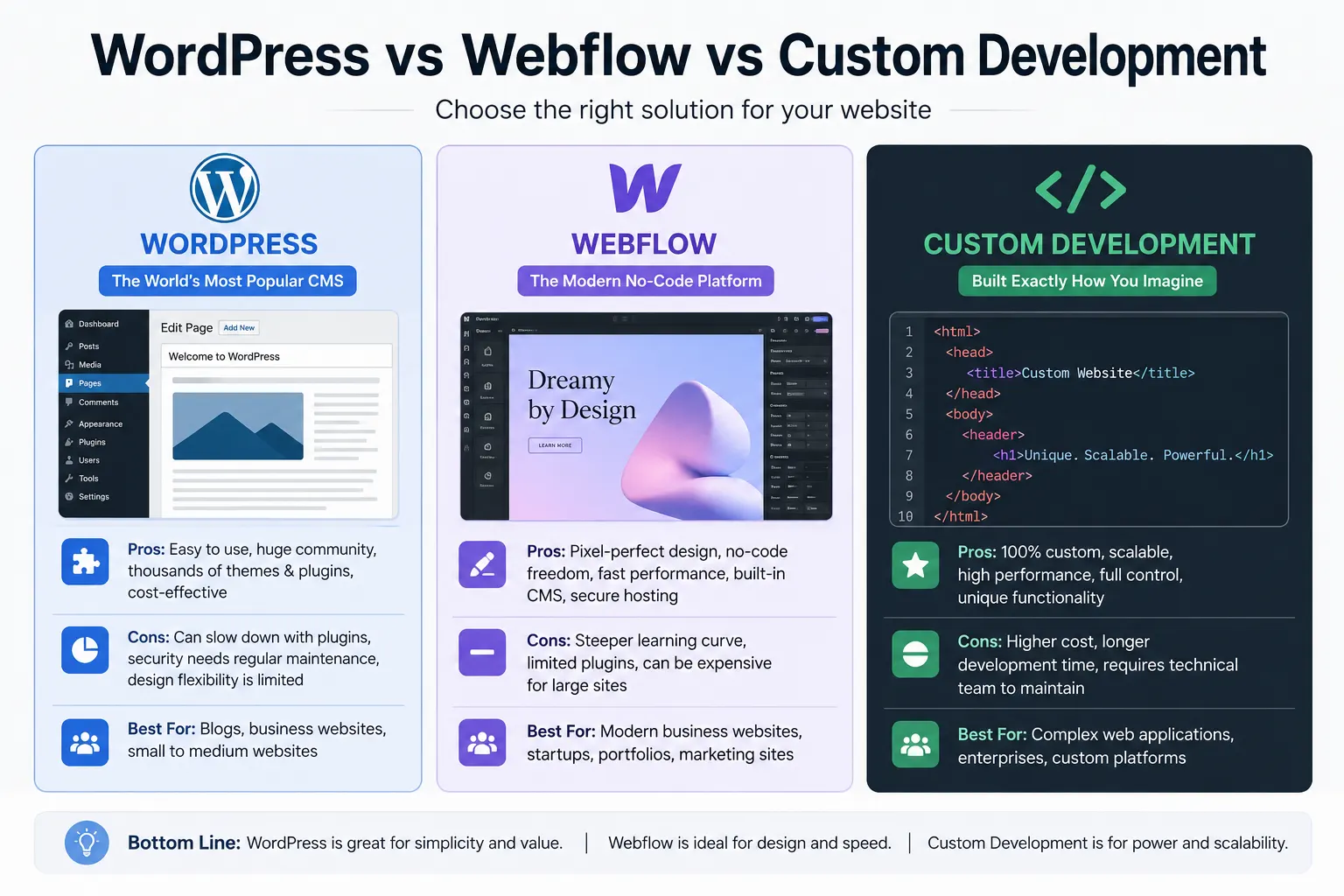
The three options that dominate the conversation in 2026 are WordPress, Webflow, and custom development. Each has real strengths, real limitations, and a specific type of business they are best suited for.
This guide will give you an honest, jargon-free breakdown of all three so you can make the right choice for your business, not just follow the trend.
Option 1: WordPress The Veteran Champion
WordPress powers approximately 43% of all websites on the internet as of 2026. Originally built as a blogging platform in 2003, it has evolved into the world’s most popular Content Management System (CMS) a platform that allows you to build and manage a full website without needing to write code.
How WordPress Works
WordPress is open-source software. You download it, install it on a web hosting server, choose a theme (visual template), and add functionality through plugins ready-made add-ons for things like contact forms, eCommerce, SEO, and speed optimisation. Thousands of themes and tens of thousands of plugins are available, both free and paid.
The Strengths of WordPress
- Massive ecosystem: With over 60,000 plugins available, virtually any functionality you can imagine can be added to a WordPress site.
- Huge talent pool: Because WordPress is so widely used, finding developers, designers, and freelancers who know the platform is easy and affordable.
- Complete content control: Non-technical users can update text, images, blog posts, and pages without touching code.
- Excellent for SEO: Plugins like Yoast SEO or Rank Math make SEO management straightforward even for beginners.
- Cost-effective: WordPress itself is free. Hosting, premium themes, and plugins represent the main costs which can be quite affordable.
- Proven at scale: WordPress powers everything from personal blogs to major media outlets and Fortune 500 websites.
The Limitations of WordPress
- Maintenance overhead: WordPress requires regular updates to the core software, themes, and plugins. Neglecting these can lead to security vulnerabilities.
- Plugin conflicts: With multiple plugins installed, compatibility issues can arise sometimes breaking functionality unexpectedly.
- Performance can suffer: Poorly chosen themes and excessive plugins can slow a WordPress site significantly. Proper optimisation is essential.
- Security risks: Because WordPress is so widely used, it is a frequent target for hackers. Proper security measures and a good hosting provider are non-negotiable.
- Template limitations: Many WordPress sites end up looking similar because they use popular themes. Truly unique designs require custom development work within WordPress.
Who Is WordPress Best For?
WordPress is an excellent choice for: businesses that need to regularly publish content (blogs, news, resources); eCommerce businesses using WooCommerce; businesses with limited budgets who need a capable, flexible site; and organisations that want to manage their own content without technical knowledge.
Option 2: Webflow The Designer’s Platform
Webflow is the platform that has most disrupted the web design industry over the past five years. Launched in 2013 and now serving over 3.5 million websites, Webflow is a visual website builder that generates clean, production-ready code allowing designers to build highly custom websites without writing code themselves.
How Webflow Works
Webflow sits somewhere between a page builder and a full development platform. You design visually dragging, placing, styling elements on a canvas and Webflow generates the underlying HTML, CSS, and JavaScript automatically. It also includes a powerful CMS for content management and hosting through Webflow’s own infrastructure.
The Strengths of Webflow
- Unmatched design freedom: Because you are working visually with full CSS control, Webflow allows for pixel-perfect, highly unique designs that are difficult to achieve in template-based systems.
- Clean, optimised code: Unlike many page builders, Webflow generates clean code which means better performance and better SEO.
- All-in-one platform: Design, CMS, hosting, and SSL are all managed within Webflow reducing the number of external tools and services you need.
- Excellent animations and interactions: Webflow’s interaction tools allow for sophisticated scroll animations and hover effects without plugins.
- Fast and secure hosting: Webflow’s hosting is built on enterprise-grade infrastructure with a global CDN, making sites fast and reliable.
- No plugin security risks: Unlike WordPress, Webflow does not rely on third-party plugins, eliminating a major vulnerability.
The Limitations of Webflow
- Higher monthly cost: Webflow’s hosting plans are more expensive than basic WordPress hosting. For complex CMS needs, costs can add up.
- Steeper learning curve: For non-designers attempting to self-manage complex sites, Webflow’s interface can feel overwhelming.
- Limited eCommerce functionality: Webflow’s built-in eCommerce is improving but still lags behind WooCommerce and Shopify for complex online stores.
- Smaller talent pool: Fewer agencies and freelancers work with Webflow compared to WordPress, making specialists harder to find.
- Platform dependency: Your site lives on Webflow’s platform. If Webflow changes its pricing or terms significantly, you are somewhat locked in.
Who Is Webflow Best For?
Webflow is ideal for: businesses that need a visually distinctive, highly customised design; marketing agencies or SaaS companies with strong brand identities; businesses that want an all-in-one managed platform with no plugin maintenance; and projects where design quality is the top priority.
Option 3: Custom Development Full Control, Maximum Power
Custom development means building your website from the ground up using code typically with frameworks like React, Next.js, Laravel, or similar technologies rather than relying on a pre-built CMS platform.
This is how large-scale web applications, complex eCommerce platforms, and enterprise websites are typically built.
The Strengths of Custom Development
- Unlimited flexibility: There is no constraint on what you can build. Any feature, any integration, any user experience is achievable with custom development.
- Optimised performance: Custom-built sites can be architecturally designed for speed, handling high traffic loads with ease.
- No platform dependency: You own the codebase entirely. You are not locked into any CMS, hosting provider, or platform.
- Scalability: As your business grows, a custom platform can be extended and scaled without fighting against the limitations of a CMS.
- Unique competitive advantage: A completely custom digital experience can differentiate your business in ways that template-based sites simply cannot.
The Limitations of Custom Development
- Significantly higher cost: Custom development is the most expensive option both to build and to maintain. Budgets typically start from ₹3,00,000 and can reach into the millions for complex platforms.
- Longer development time: A custom build takes longer than working with WordPress or Webflow often 3 to 6 months or more for complex projects.
- Ongoing developer dependency: Unlike CMS platforms, custom sites typically require a developer to make changes. Self-management is limited.
- Higher maintenance costs: Security updates, bug fixes, and feature additions require ongoing developer involvement.
Who Is Custom Development Best For?
Custom development makes sense for: businesses with highly specific functional requirements that no CMS can meet; large eCommerce platforms with complex inventory, pricing, or logistics needs; web applications that go beyond a standard website (booking platforms, marketplaces, SaaS products); and enterprise businesses that require deep integrations with existing software systems.
Side-by-Side Comparison
Here is a quick reference to help you evaluate the three options:
- Cost WordPress: Low to Medium | Webflow: Medium | Custom: High
- Design Flexibility WordPress: Medium | Webflow: High | Custom: Unlimited
- Ease of Self-Management WordPress: High | Webflow: Medium | Custom: Low
- Performance (if built well) WordPress: Good | Webflow: Excellent | Custom: Excellent
- eCommerce Capability WordPress (WooCommerce): Excellent | Webflow: Basic-Moderate | Custom: Unlimited
- SEO Capability All three: Excellent when implemented correctly
- Security WordPress: Good with maintenance | Webflow: Excellent | Custom: Depends on implementation
- Time to Launch WordPress: Fast | Webflow: Fast to Medium | Custom: Slow
So Which Should You Choose?
The honest answer is that there is no universally correct answer it depends entirely on your specific business needs, budget, and goals.
Choose WordPress if: you need a content-heavy site with regular publishing, you want to manage content yourself, you are running eCommerce on WooCommerce, or you have a tighter budget.
Choose Webflow if: design distinctiveness is a high priority, you want all-in-one managed hosting, you value clean performance without plugin maintenance, or you are building a brand-forward marketing website.
Choose Custom Development if: your requirements are complex and cannot be met by a CMS, you need a web application rather than just a website, you are planning to scale significantly, or you have the budget for long-term custom maintenance.
The most important thing is to make this decision based on your requirements not based on what a developer happens to know or what is currently trendy. The best platform is the one that serves your business goals most effectively within your budget.
A Final Word on “The Cheapest Option”
Whichever platform you choose, invest in quality execution. A poorly built WordPress site will underperform a well-built Webflow site. A rushed custom build will disappoint. Platform choice matters but the skill, experience, and strategic thinking of your development team matters far more.
Do not choose a platform. Choose an agency or developer that truly understands your goals and can execute brilliantly on any platform they recommend.